Works with Dynamics 365 Business Central, Finance & Operations and SAP Business One

The retail platform built for Africa.
Seamless with Dynamics 365.

SalesLife runs your tills, stock, procurement and finance in one platform. Cashiers keep selling through outages, M-Pesa and KRA eTIMS are built in, and every sale reaches your ERP through SalesLife HQ with a full audit trail.

  • Offline-first cash sales on every till
  • KRA eTIMS signing built in
  • M-Pesa, Airtel Money and cards
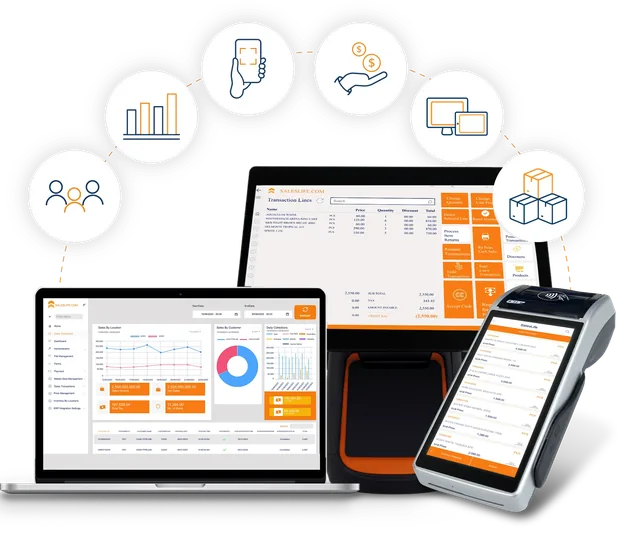
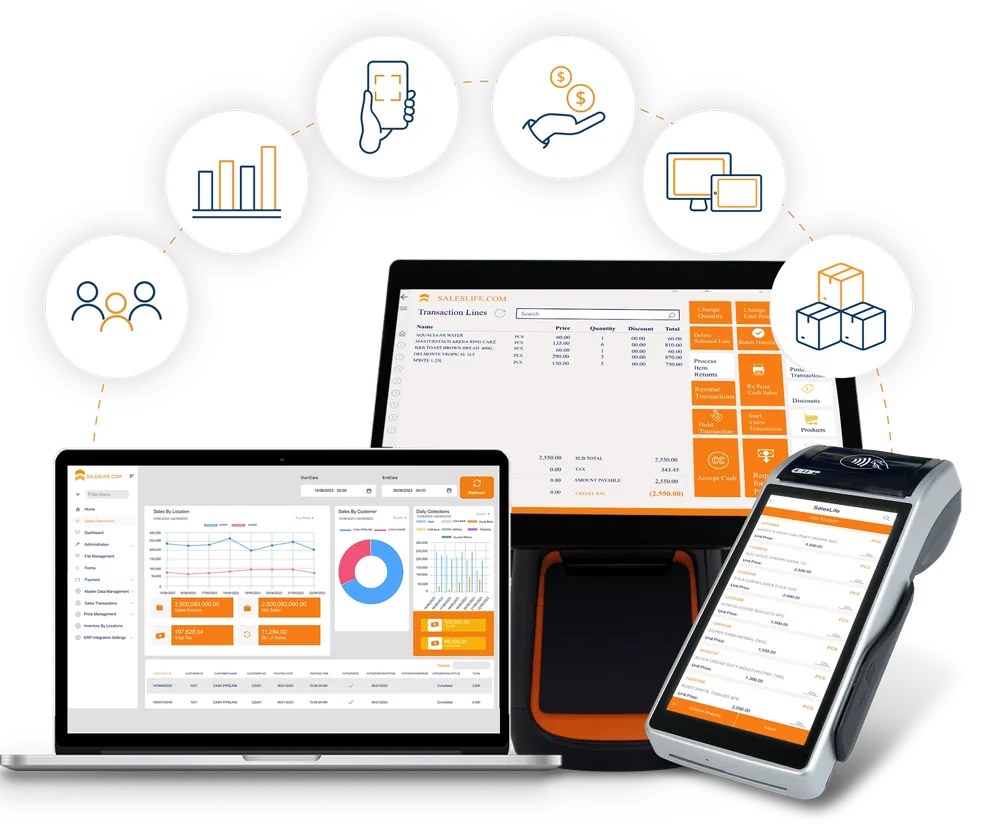
SalesLife POS on a laptop sales dashboard, a counter touchscreen terminal and a handheld POS with built-in printer, surrounded by icons for customers, reporting, mobile scanning, payments, devices and inventory
Posted to Business CentralCash sale integrated · Completed
HQ unreachableCash sales continue. Outbox replays on reconnect.
Connects with
  • Dynamics 365 Business Central
  • SAP Business One
  • KRA eTIMS
  • M-Pesa
  • Airtel Money
  • Pesapal
  • EazzyPay
  • SMART
Why SalesLife

Retail in Africa doesn't wait for perfect conditions. Neither should your POS.

SalesLife is built for African multi-branch operators: offline-first at the till, orchestrated through SalesLife HQ, and connected to the ERP, fiscal and payment systems you already depend on.

Sells through the outage

Cash sales, cash tender, credit-account sales and local stock lookup continue when the network drops. Sales sit on a local branch database, and failed pushes queue in an outbox and replay on reconnect.

Pay the African way

M-Pesa STK Push and C2B, Airtel Money, card terminals (Pesapal, EazzyPay), cash, gift cards and loyalty points, with split tender in one transaction.

KRA eTIMS in the sale flow

Sales and refunds are signed through a local VSCU agent, with the fiscal QR stored on the document. Unsigned invoices queue offline and are retried automatically.

ERP posting you can trust

SalesLife HQ validates, stages and posts to Dynamics 365 Business Central or SAP Business One idempotently. Branch tills never hold ERP credentials.

The platform

One platform for the store, the warehouse, finance and HQ.

Twenty-two functional modules in six areas, from the first scan at the till to the posted ledger entry in your ERP.

0functional modules
0standard reports, PDF and CSV export
0AI agents in the programme
∞offline cash sales
01

Sell

Cash sale, self-checkout, returns and documents.

  • Barcode, category grid, advanced search and live food-scale weight
  • Split tender with supervisor gates on discounts and price changes
  • Hold and resume, cashier handoff, customer display
  • Returns, exchanges and assisted refunds with reason codes
  • Self-checkout lane and a queue-busting handheld
  • Lay-by, gift cards, loyalty, quotations and sales orders
  • Till open and close, safe drops, variance and Z-report
02

Supply

Purchase orders, receiving, transfers and production.

  • PO to GRN to AP invoice with three-way match
  • Inter-branch transfers with in-transit tracking
  • Blind cycle counts and variance posting
  • Batch with FEFO and expiry, plus serial traceability
  • Work orders and recipe BOMs for food and kitting
  • Reorder suggestions, rules-based and AI-assisted
  • Consignment stock and stock adjustments
03

Finance

Receivables, payables, tax and settlements.

  • AR ageing, customer statements and credit-limit checks at the till
  • AP invoices, vendor payments and ageing
  • WHT certificates, VAT summary and zero-rated disclosure
  • M-Pesa C2B and settlement-file reconciliation
  • Bank and PesaLink settlement reconciliation
  • End-of-day financial batches with review
04

Connect

HQ sync, ERP, fiscal, payments and partners.

  • Bi-directional SalesLife HQ sync with an outbox and conflict resolver
  • Dynamics 365 Business Central and SAP Business One posting
  • KRA eTIMS, M-Pesa, Airtel Money, Pesapal and EazzyPay
  • SMART insurance member lookup and claim files
  • SMS, WhatsApp and email receipts and documents
  • Delivery partners mapped for settlement: Glovo, Uber, Bolt, Jumia
05

Intelligence

Reports, dashboards and local-first AI.

  • 112 standard reports that run on local branch data
  • Store dashboard: today's sales, hourly chart, top products, payment mix
  • HQ dashboard: cross-branch sales, tenders, labour and shrinkage
  • Scheduled report export for automated distribution
  • Replenishment, anomaly and analytics-copilot agents
06

Trust

Access control, approvals and audit.

  • Role-based permissions scoped to authorised branches
  • Supervisor approval and two-supervisor dual approval
  • Fingerprint and facial approval with TPM-backed storage
  • Windows Hello sign-in and automatic till lock
  • Encrypted backups and a credential locker for secrets
  • Full audit logs on overrides and master-data changes
Processes

See how work flows through SalesLife.

Six everyday journeys, from the first scan at the till to the posted entry in your ERP. Choose one to follow it step by step.

How a sale flows through SalesLife

From the till to the ledger, with fiscal signing and sync in step.

StartCustomer sale
  1. Till

    Take the sale

    Scan items, apply promotions and loyalty, with supervisor gates on discounts and price overrides.

  2. Payments

    Take payment

    Cash, card, M-Pesa STK or Airtel Money, alone or split across tenders.

  3. KRA eTIMS

    Sign the invoice

    The sale is signed through the local VSCU agent and the fiscal QR is stored. If it cannot be signed, it queues and retries.

  4. Till

    Give the receipt

    Print it, or send it by SMS, WhatsApp or email.

  5. SalesLife HQ

    Sync and stage

    The branch pushes the sale to HQ, which validates and stages it. Failed pushes wait in the outbox.

  6. ERP

    Post to the ledger

    HQ posts to Dynamics 365 Business Central or SAP Business One once, with audit references.

ResultPosted sale with a full audit trail

Read about KRA eTIMS signing →

ERP integration

Your ERP stays the system of record. SalesLife HQ keeps it clean.

Branch tills never call your ERP directly. SalesLife HQ validates every document, stages it, and posts it idempotently to Dynamics 365 Business Central or SAP Business One, so a retry never double-posts.

  • Master data down: items, customers, vendors, price lists and warehouses pulled from the ERP to every till.
  • Transactions up: posted cash sales, refunds, credit memos, end-of-day batches and loyalty movements.
  • Procurement to ledger: PO publish, goods receipt confirmation and AP invoice posting.
  • Production posting: work orders for food-scale and kitting sales post to the ERP.
  • Reconciliation built in: a month-end POS-to-ERP report and audit references on every posting.
  • Safe by design: branch POS holds no ERP credentials. Secrets stay with HQ.
Architecture: branch tills, handhelds, self-checkout and the Customer App sync with SalesLife HQ, which posts to Dynamics 365 Business Central or SAP Business One, with M-Pesa, card payments and KRA eTIMS connected. Branch tills Windows · offline-first Handhelds Queue busting Self-checkout Lane · Till card Customer App Orders · Loyalty SalesLife HQ Validate · Stage · Post Idempotent ERP workers Dynamics 365 Business Central SAP Business One Mobile money M-Pesa · Airtel Cards Pesapal · EazzyPay Tax authority KRA eTIMS Master data ↓ · Transactions ↑ · Branch tills never call the ERP directly

↓ HQ to the till (pull)

  • Products, barcodes, variants, BOMs and categories
  • Customers, groups, price lists, promotions and discounts
  • Users, roles and branch access
  • Inventory snapshots and HQ stock enquiry
  • Tills, locations and payment-method configuration

↑ Till to HQ (push)

  • Posted cash sales, refunds and credit memos
  • End-of-day financial batches and till-close events
  • Loyalty transactions and member changes
  • Workstation and till registry
  • Audit and operations events

Resilience

  • Sync outbox: failed pushes queue with retry
  • Conflict screen to resolve local vs HQ master data
  • Manual Sync now, master pull and outbox replay
  • Operations-health view for sync and fiscal queues
FlowSAP Business OneDynamics 365 Business Central
Master dataItems, business partners, price lists and warehouses via HQ pull workersItems, customers and vendors via HQ
SalesA/R invoices, incoming payments and inventory issues from POS salesCash sale push and order pull via HQ
ProcurementPO publish, GRN to goods receipt PO, AP invoice postingPurchase documents via HQ staging
ProductionWork order and production posting for food-scale and kittingAssembly orders via HQ
ReconciliationMonth-end POS-to-ERP report, idempotent posting with audit refsIntegration mapping workbook
SalesLife Customer App

Your brand, your store, in every customer's pocket.

A whitelabeled mobile commerce app that extends your operation beyond the till. Each client gets a fully branded app, with logo, colours, stores and membership programme, on the same engine that runs your POS, HQ and ERP.

4core journeys
1:1loyalty at the till
M-Pesanative payments
100%whitelabel ready
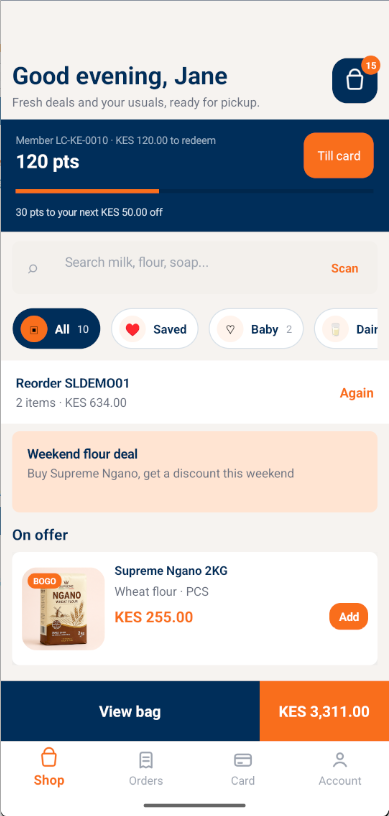
Customer App home screen with a loyalty balance, search, offers and a bag total
Shop & discoverThe same products, prices and promotions as the till. Favourites, barcode scan, BOGO offers and one-tap reorder.
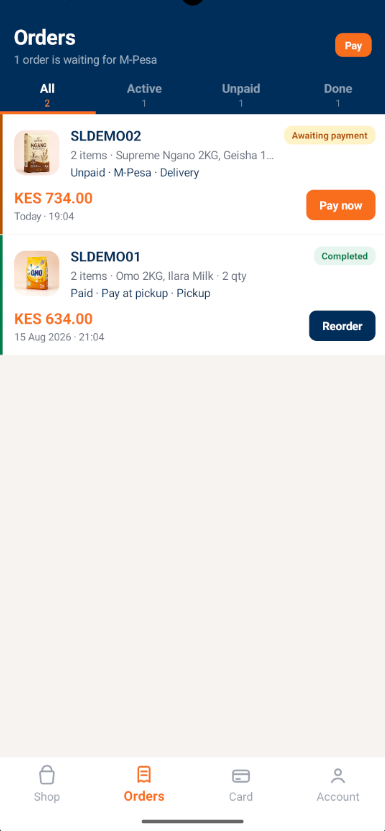
Customer App orders screen with active, unpaid and completed filters
Orders & fulfilmentActive, unpaid and completed orders, M-Pesa pay-now, pickup or delivery, and push notifications.
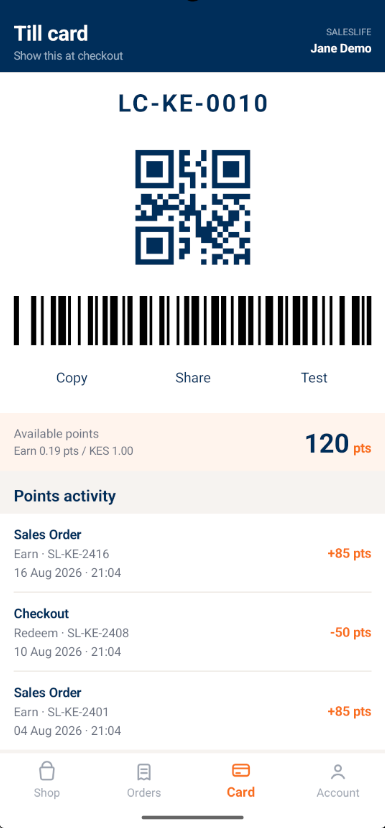
Customer App till card with a QR code, barcode and points activity
Till card & loyaltyA digital membership card with QR and barcode. Scan at the register to earn and redeem across branches.
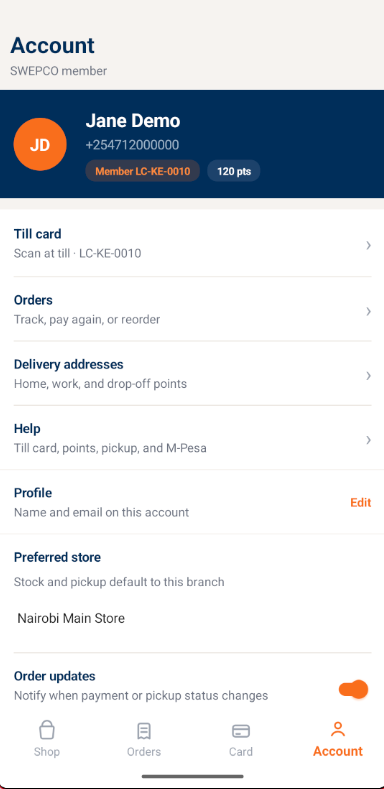
Customer App account screen with profile, preferred store and delivery addresses
Account & whitelabelProfile, preferred store, delivery addresses and help, themed per client without forking code.

Screens shown are from a demonstration tenant. Production apps carry each client's logo, colours and membership programme name.

AI platform

Local-first intelligence that never blocks checkout.

Inference runs on the till PC or a branch appliance, so customer data does not need to leave the store. AI is off by default, and agents propose while people approve.

  • Local-first No customer PII has to leave the store
  • Till-safe Timeouts, circuit breaker and heuristic fallback
  • Idle-gated Background runs skip while a till is active
  • Human gate Dual approval for price changes, write-offs and draft POs
A1Live

Demand & replenishment

Suggests reorder quantities from sell-through velocity, reorder points and days of cover, with a plain-language rationale.

A2Live

Shrinkage & anomaly

Flags refund spikes, void rates, discount abuse, till shortages and cashier concentration, with a ranked factor list.

A3Live

Analytics copilot

Ask questions in plain English about sales, top products, low stock and refunds. Read-only tools, it never writes.

A4Roadmap

Pricing advisor

Margin-erosion alerts and basket promotion ideas. Never writes prices on its own.

A5Roadmap

Fiscal assistant

Explains eTIMS queue failures, prioritises retries and summarises withholding tax.

A6Roadmap

Loyalty concierge

Guides enrolment, shows tier progress and explains redemption rules.

A7Roadmap

Sync steward

On reconnect, prioritises conflict resolution and outbox replay.

A8Roadmap

SOP coach

In-app help for cashiers, searched from your local procedures pack.

Industries

Built around how African retailers operate.

The same platform adapts to the way each sector sells, stocks and settles.

Supermarkets & FMCG

Fast lanes, self-checkout and a queue-busting handheld for the busy floor. Loyalty, gift cards and delivery partners sit beside branch procurement and cycle counts, with every sale posted to your ERP.

  • Self-checkout lane
  • Queue busting
  • Cycle counts
  • Loyalty
  • Delivery partners
Self-checkoutand queue busting from the same till software
Compliance & controls

Fiscalised in-flow. Controlled end to end.

KRA eTIMS signing happens inside the sale through a local VSCU agent. The fiscal QR payload is stored on the document, and nothing is lost if the signer is briefly unreachable.

  • Unsigned invoices queue offline and a background worker retries
  • SLA breaches escalate to a compliance officer task queue
  • Bulk or single fiscal retry, with supervisor approval
  • A simulator mode for user acceptance testing without a live VSCU
  • Segregation-of-duties exception reporting and a security override log
eTIMSKRA eTIMSSales and refunds signed via VSCU
WHTWithholding taxGenerate, issue and export certificates
VATVAT reportsSummary and zero-rated disclosure
M-PesaM-Pesa reconC2B paybill matching and Safaricom CSV import
BankBank settlementBank and PesaLink reconciliation
SMARTInsurance claimsMember lookup and claim files at the till
2×Dual approvalTwo supervisors for high-value actions
AuditAudit trailOverrides and master-data changes logged
Built for KenyaOther markets: ask us
Deployment

From first install to a fleet of tills.

One Windows package, one first-run wizard, and a branch server model that keeps every till in step.

  1. 01

    Install

    Deploy the MSIX package with a Demo or Production profile. The first-run wizard sets the database, till code, currency, HQ URL and an optional AI endpoint.

  2. 02

    Connect

    Link the branch to SalesLife HQ, map the ERP posting, and set your payment and eTIMS details. Master data pulls down to every till.

  3. 03

    Go live

    Till 1 hosts the branch PostgreSQL database and extra tills discover it and register. Fleet-wide, every till runs the same version.

  • Safe-mode recovery start
  • Encrypted branch backups
  • Pre-close checklist
  • Command palette (Ctrl+K)
  • Sync outbox view
  • Signed release pipeline
Watch

See SalesLife POS in the real world.

Short, honest videos from our YouTube channel: who uses SalesLife, and what a retailer says after going live.

Client testimonial SalesLife POS + SAP Business One A SalesLife client in their own words. From the SalesLife Retail and POS channel.
Short Who uses SalesLife POS A quick look at the businesses that run on SalesLife.

More on our YouTube channel →

Resources

Download the detail.

Share these with your finance, IT and operations teams. Both are free to download.

PDF · 20 pages · 0.5 MB · v1.0, August 2026

SalesLife POS Solution Capability Guide

Every module in detail: sales and till, procurement, finance and tax, HQ sync, SAP B1 and Dynamics 365 BC integration, AI agents, security and deployment.

Download the guide
PDF · 10 pages · 0.3 MB · August 2026

SalesLife Customer App brochure

The four customer journeys, how the app connects to POS, HQ and ERP, and how whitelabel deployment works for each retail banner.

Download the brochure
FAQ

Questions retail and finance teams ask us.

How does SalesLife connect to Dynamics 365 and SAP Business One?

Through SalesLife HQ. Branch tills sync to HQ, and HQ validates, stages and posts documents to your ERP with idempotent workers. The till never holds ERP credentials and never calls the ERP directly. Business Central and SAP Business One each have their own mapping for master data, sales, procurement and production.

What happens when the power or internet goes down?

Cash sales, cash tender, credit-account sales and local stock lookup continue on the branch database. Things that need the network, such as M-Pesa STK push, card terminals, HQ sync and cloud fiscal signing, pause until connectivity returns. Failed pushes queue in an outbox and replay on reconnect, and unsigned eTIMS invoices queue and retry.

Is SalesLife compliant with KRA eTIMS?

Yes. Sales and refunds are signed through a local VSCU agent following the KRA specification, and the fiscal QR payload is stored on the document. There is an offline queue, an escalation path for SLA breaches, and a simulator mode for testing without a live VSCU.

Which payment methods are supported?

Cash, card terminals (Pesapal, EazzyPay and a generic gateway), M-Pesa STK Push and C2B, Airtel Money STK, bank transfer, vouchers, instalments, gift cards and loyalty points, in split tender if needed. Settlement reconciliation covers M-Pesa, bank and PesaLink.

What hardware does it run on?

SalesLife POS is a Windows application, packaged as MSIX, for Windows 10 and 11 tills. It supports live food-scale weight, a second-monitor customer display, a self-checkout lane and a queue-busting handheld companion on the same PC. Share your hardware list and we will confirm it during scoping.

Is the AI switched on by default, and does my data leave the store?

No. AI is disabled by default and runs local-first on the till PC or a branch appliance, so customer data does not need to leave the store. It never blocks checkout, background runs wait until the till is idle, and agents only propose. Actions like price changes and write-offs need human approval.

Can we offer our own branded app to customers?

Yes. The SalesLife Customer App is whitelabeled per retail banner with your logo, colours, stores and membership programme. It shares master data and loyalty with the till through HQ, and orders arrive in the branch fulfilment queue.

How is SalesLife deployed and kept up to date?

Tills install from a signed MSIX package. A first-run wizard sets the database, till code, currency and HQ URL. One till hosts the branch database, other tills discover it, and every till in the fleet runs the same version. Encrypted backups and an operations-health view are built in.

Book a demo

See SalesLife on your products, your branches and your ERP.

Tell us about your business. A SalesLife retail specialist will walk you through the till, checkout, M-Pesa, eTIMS and HQ sync in a live environment, and show the Customer App configured with your logo and stores.

  • Live sync into a Business Central or SAP Business One sandbox
  • Offline trading, M-Pesa and eTIMS demonstrated end to end
  • A whitelabel Customer App with your logo and stores
Email: hello@saleslife.com Mezzanine Floor, Titan Complex, Chaka Road, Nairobi, Kenya A Software Dynamics Limited product

We use your details only to reply to this request. We reply within one business day.